New construction leads worth your next call.
Every new build in your territory is a takeoff somebody is going to quote. Radar ranks them by what the job pack is worth and tells you who is buying — while they're still shopping the takeoff.
Free during the beta. No card required. We confirm your territory and get your reps into the queue.
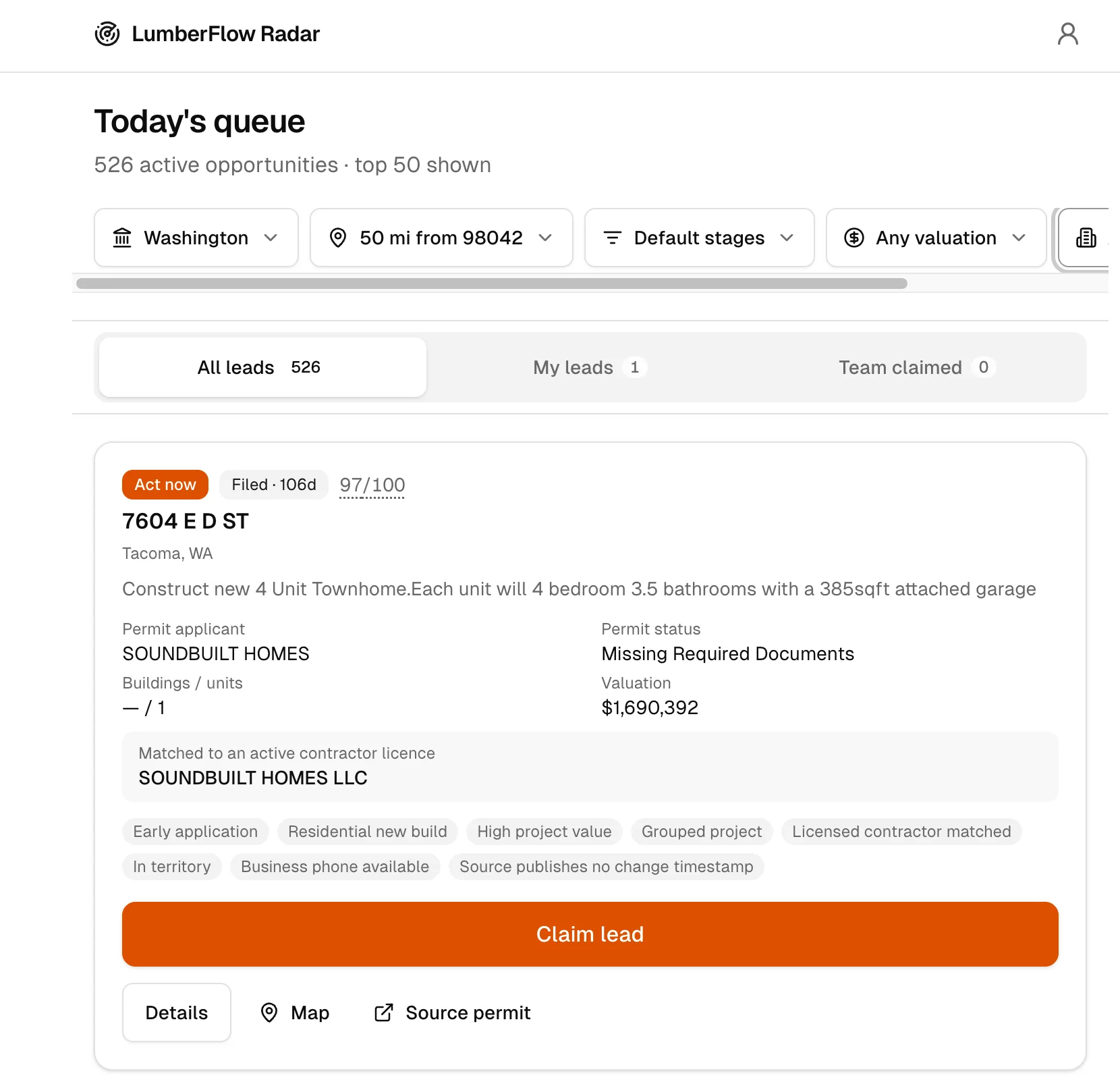
LumberFlow Radar is construction lead and sales prospecting software for lumberyards. Every new build in the territory is a takeoff someone is going to quote. Radar ranks those projects by what the job pack is worth, so reps review the evidence, claim the takeoffs they choose, and keep the next step visible.
Your best rep should be selling. Not searching.
Start the morning on the takeoffs worth a call, put one name on each, and leave the team a record of what happened next.
- 1 of 4
Open the queue
Open the day on local projects ranked by what the job pack is worth.
- 2 of 4
Claim the takeoff
Check the evidence, then put one name on the takeoff.
- 3 of 4
Reach the builder
Reach the builder while the package is still being sourced.
- 4 of 4
Leave a record
Leave the account knowledge with the company, not in one rep's head.
Find builders beyond your existing accounts
Start with one delivery area and one rep. Review projects outside your account list, check delivery fit and who buys the package, then assign an owner and next action. Radar keeps project notes and follow-up in one shared queue. Tell us where you sell; we confirm coverage and help your team get started.

Don’t be the last yard to hear about the next job.
Radar ranks the local job packs by what they are worth. Your rep still decides whether the work fits the territory, customer, and moment.
- Where the project is, and whether it sits in the territory your team covers
- What is being built, how big the job pack runs, and where it sits in the schedule
- Who to call — the business and the people tied to the work, where records exist
- Why this takeoff outranked the others, in plain language a rep can argue with
Every opportunity needs an owner.
All, Mine, and Team views keep open work, ownership, activity, and disposition in one place. A manager can see what happened next without rebuilding the story in a status meeting.
All
Review the open queue across the territory.
Mine
Give each rep a clear book of active work.
Team
See ownership, activity, and disposition together.
Now in beta: your AI Daily Sales Brief
What to work, why it matters now, what to do next — for each rep, every morning.
A daily brief shaped around the rep
Priority · reason · next action
Use the source. Keep the rep’s judgment.
Source detail and field availability vary by jurisdiction. Radar shows the available record and ranking explanation so a rep can verify timing, scope, and fit before outreach.
Tell us where your team sells.
Tell us where your team sells. We'll confirm source coverage for that territory and get your reps into the queue.
Free during the beta. No card required. We confirm your territory and get your reps into the queue.
Questions from lumber sales teams
Straight answers about availability, coverage, project information, and the role your reps keep.
What is a construction lead for a lumber sales team?
It is a local project your team could supply — a takeoff somebody is going to quote — surfaced with enough context for a rep to decide whether it is worth pursuing. Radar ranks the project signals; your rep verifies the evidence and decides what to chase.
How does Radar find and rank projects?
Radar monitors available construction activity and ranks each project by profitability potential and deal size — using project value, housing units, and permit activity in the cluster. Every project carries a plain-language explanation of why it ranked where it did, plus a link to the source record when available.
How is Radar different from a lead list?
A list hands you records. Radar ranks the takeoffs by what the job pack is worth and gives the team a working queue with All, Mine, and Team views, named ownership, activity, nurture, and disqualification. Reps can see what is open, what is being worked, and what happened next.
Will Radar replace what my reps do?
No. Radar reduces project-search and first-pass review work. Reps keep the judgment, customer knowledge, outreach, and relationships that turn a ranked takeoff into a real sales opportunity.
Which territories does Radar cover?
Coverage varies by local source availability and operating readiness. Tell us where your team sells and we will review coverage before activation. An application does not promise availability in a territory.
Is the Radar beta free?
Radar is free during the beta and no credit card is required. Anyone can apply. We review territory coverage and fit before activation, so applying does not create immediate access. We will give at least 30 days’ notice before introducing paid terms and require your explicit acceptance before billing.
Is the AI Daily Sales Brief available?
Yes, in beta. Each morning the AI Daily Sales Brief gives a rep a short read on what to work, why it matters now, and what to do next. Ask us to turn it on for your team.
What happens after I apply?
We record your request, review your territory and workflow, and follow up about fit and next steps. If coverage is ready, we help your team get started with the appropriate organization and access.
Does Radar replace a CRM or connect to Procurement?
Radar does not replace your ERP or CRM. LumberFlow Procurement is a separate product for lumber buying, and the products do not exchange workflow data today.
The job packs are getting quoted either way. The only question is by whom.
The projects in your territory are already compiled. See what is open, put your reps on it, and stop finding out after the truss order ships.
Buying lumber too?
Explore LumberFlow Procurement for email-driven RFQs, supplier quote comparison, and buyer-approved decisions.